 Documentation
Automated data ingestion from scientific instruments
How research teams, laboratories and core facilities can move data from large scientific instruments into managed storage automatically, with metadata attached.
Modern instruments produce data faster than people can copy it. Microscopes, spectrometers, sequencers, tomographs and simulation workflows generate gigabytes to terabytes per session. In many labs, those data still travel by USB drive, sit on the instrument PC until its disk fills up, or end up in personal folders without a record of who measured what, on which instrument, with which settings.
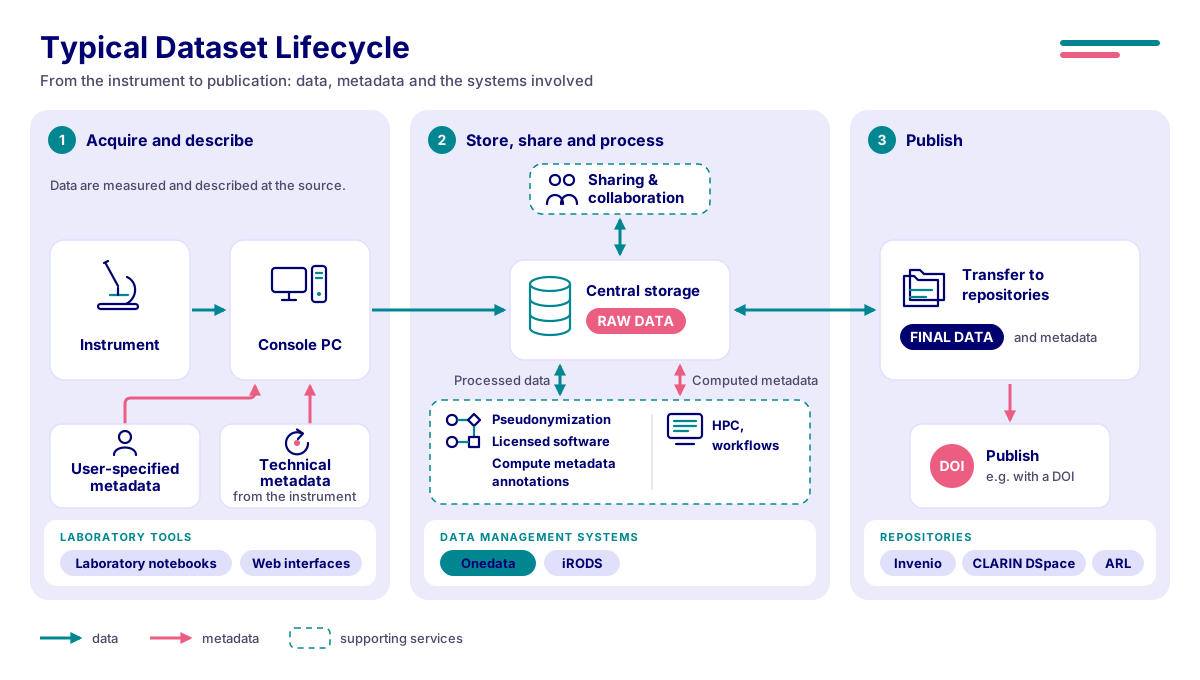
This documentation shows how to replace that manual handling with an automated ingestion workflow. In such a workflow, data leave the instrument as soon as a measurement ends, land in managed institutional storage, and carry the metadata needed to find, share, process and eventually publish them.
Click the image to open it in full size.
What automation gives your team
- No more manual copying. Data move from the instrument PC to managed storage automatically. Nobody carries drives between rooms or waits for overnight copies.
- Context is captured at the source. Every dataset is linked to the instrument, the operator, the project and the experiment. Technical metadata from the instrument and descriptive metadata from the user travel with the files.
- Instrument PCs stay clean and safe. Data no longer pile up on ageing, often unpatched acquisition computers. Some solutions also keep those computers isolated from the network.
- Faster access for the whole team. Collaborators open the data from their office, a cluster or a cloud notebook as soon as the measurement ends.
- Ready for FAIR data and publication. Structured metadata, persistent identifiers and repository integration make it far easier to publish data that support a paper.
- Institutional control. Data are stored as an institutional asset with access control, retention and backup, not as files owned by whoever happened to be at the instrument.
How it works in a nutshell
- Before measuring, the operator selects or creates a project and dataset in a web application, or the instrument is already pre-configured for it.
- During measurement, the instrument software writes data to a local folder as usual.
- Ingestion runs automatically. A client on the instrument PC, or a central service that pulls from it, transfers the files to managed storage and verifies the transfer.
- Metadata are recorded alongside the data: who, when, which instrument, which project, plus user-filled forms based on templates.
- Data are available for browsing, sharing, processing and later publication.
Read more in How automated ingestion works.
Available solutions
Three solutions are documented here. They solve the same problem with different trade-offs, so pick the one that fits your instruments, network and storage. If unsure, start with Choosing a solution.
DAREG (CEITEC MU)
Dataset registry with a desktop Lab Client that uploads measurements from instrument PCs into Onedata. Includes metadata templates, collections, sharing and DOIs.
DDRapp (TUL)
Multi-tenant platform where Apache Airflow pulls data from instrument PCs in an isolated network and backs them up to CESNET S3. Datasets can be published to the National Repository Platform (NRP).
Onedata (e-INFRA CZ)
National distributed data management service. Use it directly to build your own ingestion pipelines: mount with Oneclient, import existing storage, or script uploads over the REST API.
Who this is for
- Research teams and principal investigators who want reliable access to their measured data, with context, without chasing files.
- Core facility and laboratory managers responsible for shared instruments used by many groups.
- Instrument operators who run measurements and want the data to “just arrive” in the right place.
- Data stewards who care about metadata quality, retention and publication.
- IT and infrastructure administrators who deploy and operate the systems. Each solution has a dedicated For administrators section.
Where to start
Choose a solution
Compare DAREG, DDRapp and Onedata side by side.
Plan automation for your lab
A checklist of what to prepare: instruments, data volumes, network, metadata, people.
Glossary
Datasets, experiments, spaces, buckets, tokens and other terms used throughout.
Funding
This activity is supported by the EOSC CZ initiative, funded by the European Union and the Ministry of Education, Youth and Sports of the Czech Republic.